GitHub stars · Apache 2.0

Make GPU sharing
flexible and easy

OS-style virtual memory for LLM systems. Decouple GPU virtual addressing from physical memory. Elastic, demand-driven KV cache allocation.

Get started Read the docs
$ pip install kvcached --no-build-isolation
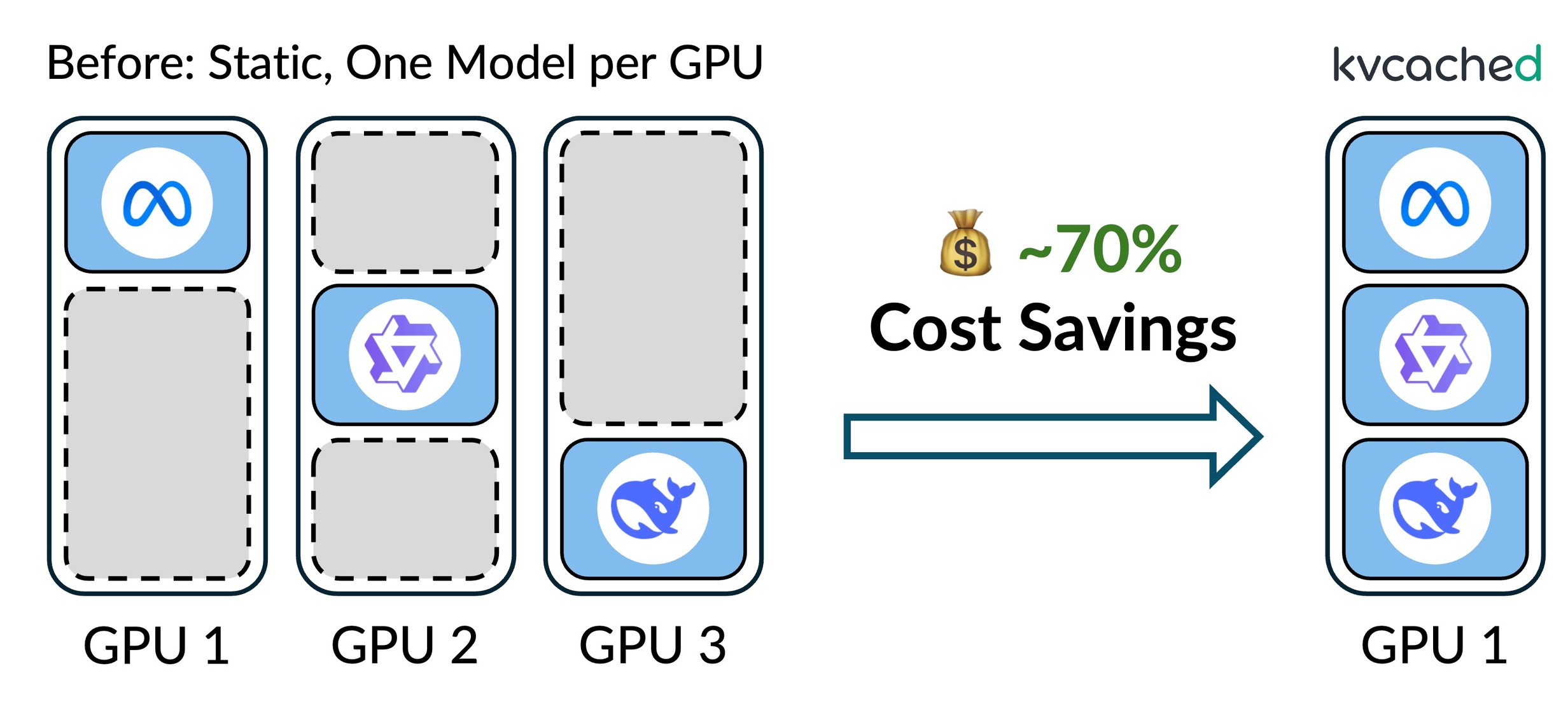
Before: 3 GPUs each running one model. After: all 3 models on 1 GPU with kvcached, saving ~70% cost.

kvcached enables multiple LLMs to share a single GPU elastically, eliminating rigid per-model memory partitioning.


Architecture

How kvcached works

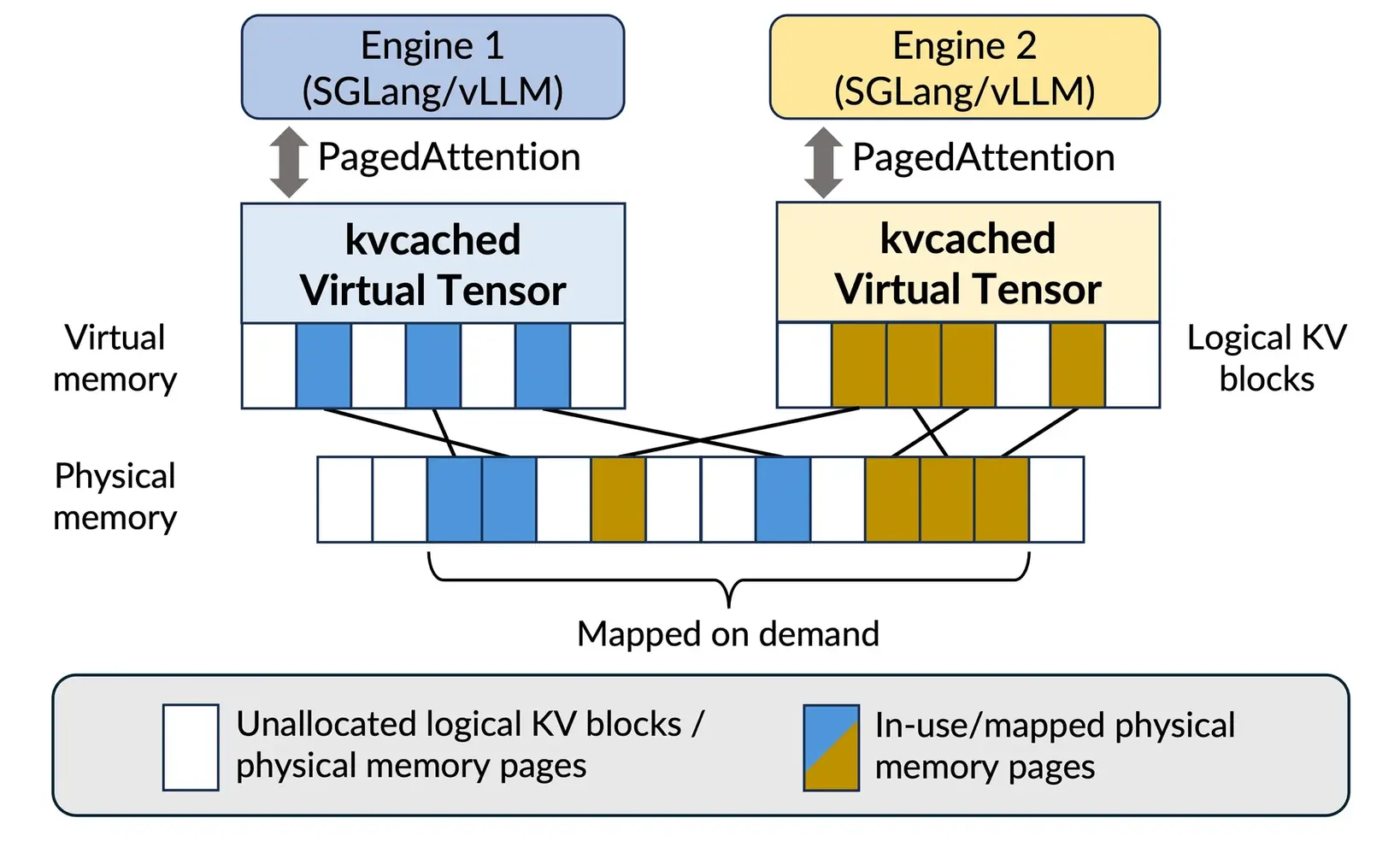
kvcached brings OS-style virtual memory abstraction to GPU KV caches. Physical memory is mapped on demand and transparently shared across serving engines.

kvcached architecture: virtual tensor layer decouples engines from physical GPU memory via on-demand mapping.

kvcached transparently releases idle physical memory to enable sharing across serving engines.

Elastic KV cache

Allocate and reclaim KV memory dynamically to match live request load.

GPU virtual memory

Decouple logical KV from physical GPU memory via runtime mapping.

Memory control CLI

Enforce memory limits and manage allocation with kvcached CLI.

Frontend router and sleep mode

Route requests to the target models and put models to sleep when idle.

Mainstream serving engines

Integrate with SGLang and vLLM. No engine changes needed.

📦

Prefix caching

Support automatic prefix caching (APC) with a configurable memory bound.


Use cases

Built for real workloads

From multi-model serving to serverless inference, kvcached adapts GPU memory to your workload.

Multi-LLM serving

Multi-LLM serving

Multiple LLMs share a GPU's memory elastically, enabling concurrent deployment without rigid partitioning.

Serverless LLM

Serverless LLM

Allocate KV cache only when needed. Models spin up and down on demand with minimal cold-start overhead.

Compound AI systems

Compound AI systems

Elastic memory across specialized models in a pipeline: retrieval, reasoning, and summarization on limited hardware.

GPU workload colocation

Workload colocation

LLM inference coexists with training, fine-tuning, or vision model workloads on the same GPU.


Performance

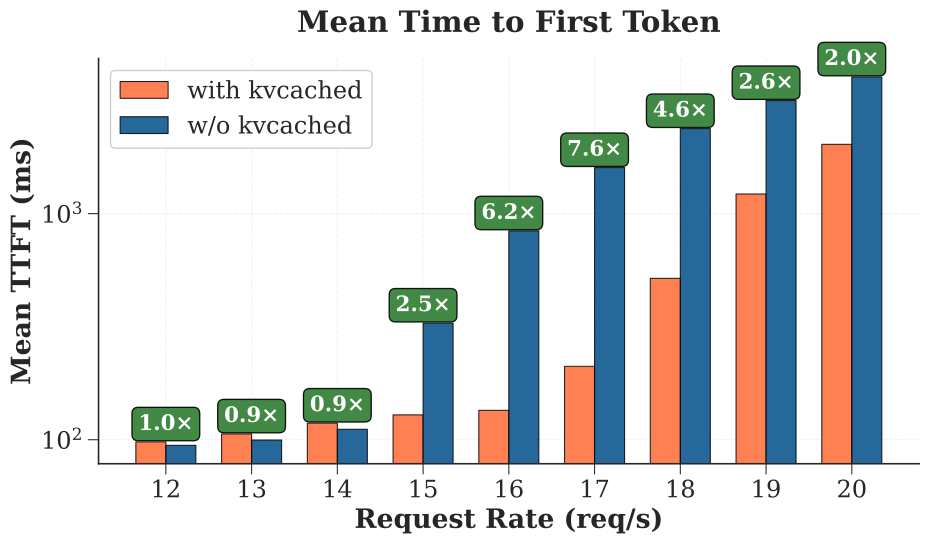
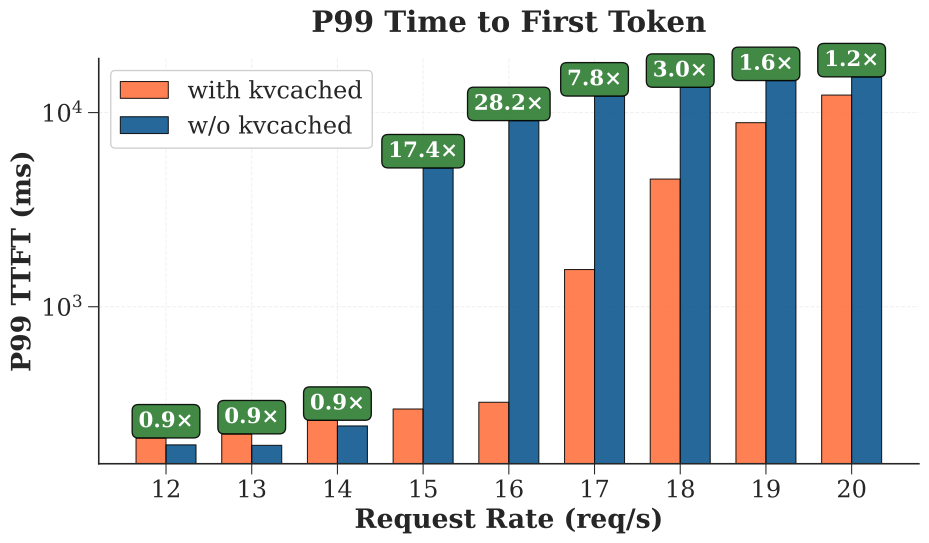
2–28x TTFT reduction

Benchmarked with 3 Llama-3.1-8B instances on a single A100-80G under intermittent peak workloads. kvcached dynamically shares memory instead of static reservation.

TTFT mean benchmark results
TTFT mean latency comparison
TTFT p99 benchmark results
TTFT p99 tail latency comparison

Research

Backed by research

kvcached builds upon cutting-edge research in GPU sharing and multi-LLM serving that has been published in top-tier venues.

📄 OSDI 2026

Prism: unleashing GPU sharing for cost-efficient multi-LLM serving

Read paper
📄 ICML 2026

Concerto: Fine-Grained GPU Harvesting for LLM Online and Offline Co-Serving

Read paper
📄 arxiv 2026

Pythia: Exploiting Workflow Predictability for Efficient Agent-Native LLM Serving

Read paper
📄 arxiv 2026

Breaking the Tradeoff: Elastic and Isolated GPU Sharing with Ghost

Read paper
📄 arXiv 2025

Towards efficient and practical GPU multitasking in the era of LLM

Read paper

Get started

Up and running in 2 minutes

# Install
pip install kvcached --no-build-isolation

# Enable kvcached
export ENABLE_KVCACHED=true
export KVCACHED_AUTOPATCH=1

# Launch your engine as usual — no code changes needed

# For SGLang
python -m sglang.launch_server --model meta-llama/Llama-3.2-1B-Instruct --port 30000
python -m sglang.bench_serving --backend sglang-oai --model meta-llama/Llama-3.2-1B-Instruct \
  --dataset-name sharegpt --request-rate 10 --num-prompts 1000 --port 30000

# For vLLM
vllm serve meta-llama/Llama-3.2-1B-Instruct --port=12346
vllm bench serve --model meta-llama/Llama-3.2-1B-Instruct \
  --request-rate 10 --num-prompts 1000 --port 12346

# Or with Docker
docker pull ghcr.io/ovg-project/kvcached-sglang:latest
docker pull ghcr.io/ovg-project/kvcached-vllm:latest

Ready to share your GPUs?

kvcached is open source under Apache 2.0. Join the community on Slack or dive into the code.

View on GitHub Join Slack